
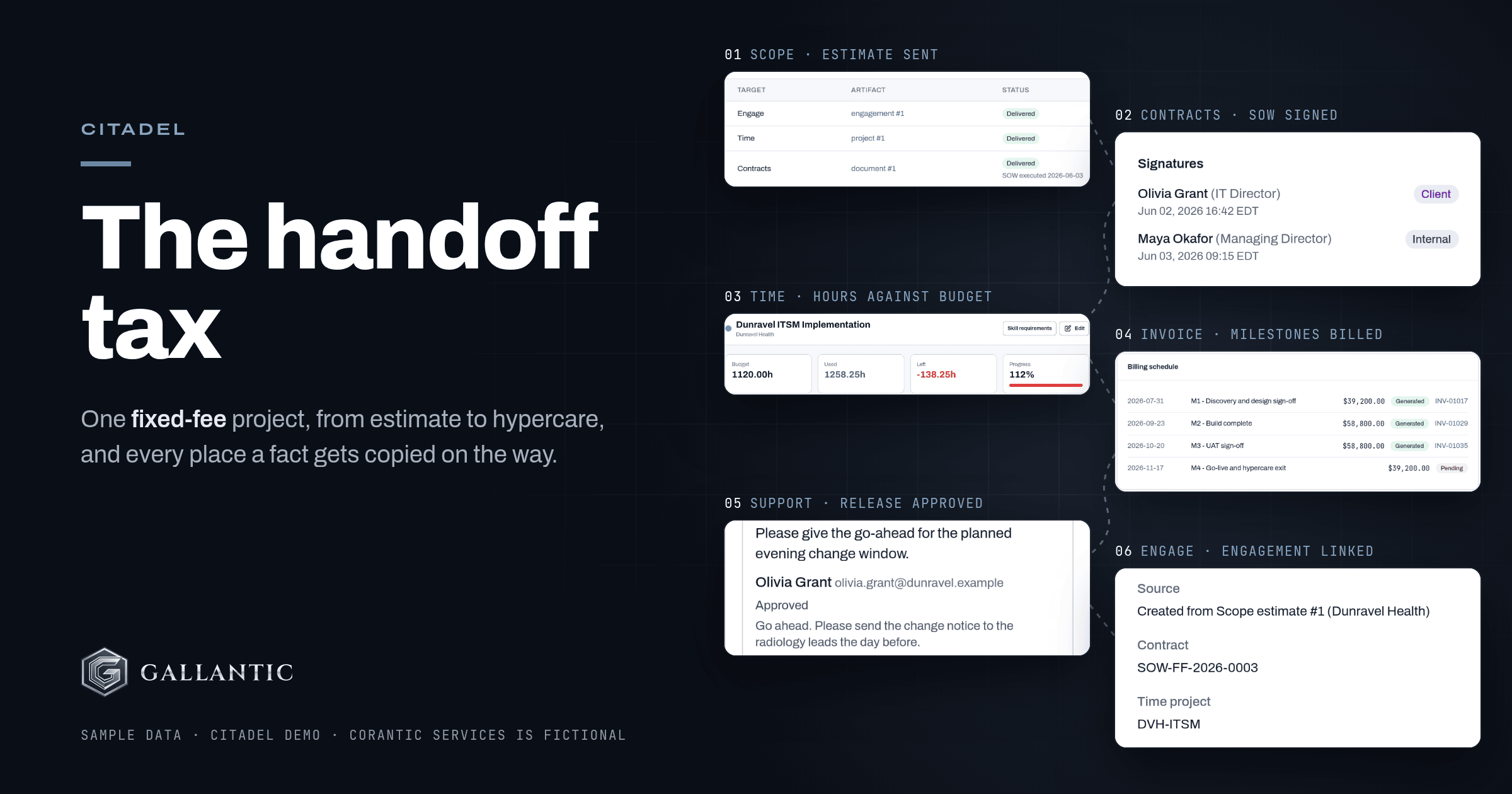
Count the systems a project passes through between the first estimate and the last invoice, and at a typical services firm you'll get to eight or more. The opportunity lives in a CRM and the estimate in a spreadsheet. The statement of work is written in Word and signed through an e-signature service. Time goes into a PSA or a timesheet tool, invoices come out of the accounting package, delivery work and support tickets sit in a ticketing tool, and the quarterly review is a slide deck.
Most of those tools do their own job well enough. The trouble is moving facts between them: either a person reads a fact in one tool and types it into the next, or an integration copies it once. Either way you end up with two copies, and sooner or later the fact changes. The fee gets revised, a milestone slips, or the client's billing contact leaves. The copy that missed the change is now wrong, and quite often it's the copy finance bills from.
We call this the handoff tax: the hours spent retyping, plus the invoices that go out late or wrong and the review meetings that open with someone asking which number is right.
The way out is to enter each fact once and have every other team read it from where it was entered. Citadel's apps work that way, and the project below ran on them, so at each handoff you can see what nobody had to retype.
We'll follow it from estimate to hypercare: Dunravel Health's ITSM implementation from the first post in this series, delivered by Corantic Services. Both firms are fictional, and the situations below are based on ones we've seen on past projects.
1. The estimate
In April, Corantic's managing director, Maya Okafor, scoped the work with Dunravel's IT director, Olivia Grant. The goal was to replace a legacy ticketing tool across three hospitals and twelve community clinics, about 9,500 staff, with single sign-on through Microsoft Entra ID and user provisioning from Workday. The estimate, built in Citadel Scope, came to 140 days of effort, priced as a fixed fee. Three items were left for a second phase on purpose: Virtual Agent and Now Assist skills, an Epic clinical alert integration and Performance Analytics premium.
Everything after this point depends on four things from April: the scope lines, the effort behind each, the price and the deferred list.
Where this tends to go wrong is the SOW being written from the last similar client's Word file instead of from the estimate. The scope gets reworded and the deferred items never reach the contract as exclusions, which leaves nothing to point to when the client later asks about the Epic integration.
2. The statement of work
When the estimate was final, Maya sent it to Citadel Contracts, which wrote the first version of the SOW from it. The scope and the fee came across from the estimate, so nobody retyped them. The document then went through three more versions. Priya Nair from the delivery team expanded the scope section, Dunravel's redline was applied, and Daniel Reyes, the delivery lead, added the term section and confirmed the milestone dates.
Corantic sends every SOW above a set value through two approval steps: a review by the delivery lead, then sign-off by the managing director. The Dunravel SOW went through both steps twice: the first approval covered a draft that Dunravel then redlined, so the redlined version had to be approved again before Olivia signed it. A single email approval of an early draft would have left nobody able to say which version the managing director agreed to.
By signature, the SOW also set out four milestones with their deliverables, dates and amounts, thirty-day payment terms, a rule that each milestone is invoiced on acceptance, and four weeks of hypercare.
3. The signature
A few days after the second approval, Olivia Grant signed for Dunravel, and Maya countersigned the next morning.
Signature is where the most retyping usually happens. In a typical stack the signed PDF gets emailed around: sales marks the opportunity won in the CRM, someone in delivery creates the project in the PSA and types in a budget, finance sets the client up in accounting and puts the first milestone in a calendar, and support creates the customer in the ticketing tool. Each of them reads the PDF for what they need, and they don't always read it the same way.
At Corantic, the signature itself did that work. Scope marked the estimate won. The project opened in Citadel Time with the estimate's workstreams as its tasks and their hours as its budget, 1,120 hours in all. The engagement opened in Citadel Engage, carrying the estimate it came from, the contract number and the Time project code. The client record lives in Contracts, and the other apps take it from there.
4. Billing
Right after countersigning, Maya entered the SOW's four milestones on the contract's billing schedule. As each one fell due, Citadel Invoice drafted the invoice. A person reviewed it, added Dunravel's PO number and the attention line, and sent it. Drafts are never sent automatically, and a milestone can't be billed twice.
Take the second milestone. The SOW's milestone table gives a target date for "Build complete", but the fee clause says each milestone is invoiced on acceptance, and Dunravel accepted the build twelve days after the target. Daniel moved the billing date on the contract and left an internal comment on the SOW explaining the change and noting that the SOW's target date stays as signed. The invoice was drafted on the new date. In a disconnected stack, that change lives in an email to finance. The invoice either goes out on the original date and gets disputed, or it waits until someone remembers.
5. Delivery
Time recorded the hours against the estimate's workstreams. Citadel Support ran the delivery work, moving work items through build, QA and UAT and into releases scheduled for Dunravel's change windows.
The October release is a good example of a handoff done well. Two of the four items Daniel had planned for it hadn't finished QA and UAT. He took them out, then asked Dunravel to approve releasing the two that had passed. Olivia approved in the client portal and added a note: "Go ahead. Please send the change notice to the radiology leads the day before."
The approval records exactly what she was asked: the window, the notes and the two work items. If anyone moves the window or changes the items after approval, the release goes back to planning. Compare that with a thumbs-up in an email thread about "the October release", whose contents may have changed since the email was sent.
6. The account view
At the end of the chain, the managing director can see the commercial position in one place. Invoice's page for the contract shows three of the four milestones billed next to the hours from Time: 1,258.25 used against a budget of 1,120. The engagement in Engage shows which estimate it came from and which contract it runs under. Nobody had to export three systems into a spreadsheet to learn that the project is 80% billed and 112% spent. (The first post in this series looks at what those extra 138.25 hours were hiding.)
Audit the handoffs on your own stack
Take one recently signed project and fill in this table for it.
| Fact | Where it's first entered | Where it's copied to | What happens when it changes |
|---|---|---|---|
| Client legal name and billing contact | |||
| Fee and commercial model | |||
| Milestone dates and billing triggers | |||
| Payment terms and PO number | |||
| Hours budget | |||
| Items deferred or out of scope | |||
| Hypercare or warranty period | |||
| Client approvers for acceptance and releases |
The first three columns fill in quickly. In a stack like the one at the top of this post, the fee alone is entered four or five times: in the estimate, the SOW, the PSA budget, the invoice and the review deck. The last column takes longer. If nobody can say what happens to the copies when a fact changes three months in, that's where your late invoices and wrong reports are coming from.
A note on integrations
The usual answer to the handoff tax is to connect the tools, through a CRM-to-PSA connector, an integration platform or a nightly export. They're good at making the first copy. What they do when the source changes is less predictable, so before you rely on one, put the last column's questions to it:
- When the milestone date moves in the contract, does the billing date move with it?
- When the client redlines the SOW, does the earlier approval still count?
- If the same record is sent twice, do you get two invoices?
- When a field is blank on one side, does it wipe the value on the other?
All of those come down to which system owns each fact. In Citadel, Contracts owns the client's company details and each contract's commercial terms, Time owns hours and budgets, and Invoice owns what was billed and paid. The other apps take those facts from the owner, and when the owner changes one, they follow. That ownership model is worth checking for in any back office, bought or assembled.
Citadel apps can be bought one at a time, and the connections switch on when you use more than one.